Tuesday, 26 May 2015

Hands on Python Programming (Building an FTP Password Cracker)

Welcome back,


Python is probably the most widely used scripting language for hackers. This is primarily because it has some built-in modules and libraries that make many of the tasks we need to do as hackers much simpler and faster.

In this guide, I want to fill in some more of the basic information about Python and then build a password cracker for an FTP server using some of things we have learned in these three modules.
Dictionaries

In Python, dictionaries act like associative arrays in other languages. We use these when we want to store a list of items (elements) and give them a label. This could be such things as user IDs to names or associating known vulnerabilities to a specific host.

Dictionaries hold unordered pairs, a key and a value, where the keys must be unique. Like lists that I addressed in the previous tutorial, dictionaries are iterable. This means that we can go through them with a control structure such as a for statement, assigning each element of the dictionary to a variable until we come to the end of the dictionary. Among other things, you might use this structure for building a password cracker where we iterate through each password in a dictionary until one works or come to the end. Dictionaries provide fast lookups.

To instantiate a dictionary, the syntax looks like this:

dict = {key1:value1, key2:value2, key3:value3…}
Control Statements

Like any programming or scripting language, often we need our code to make a decision. There are a number of ways in Python to control the flow of the script. For instance, we may want to set a conditional statement that if this.. then that… else do that. Let’s look at some of these structures in Python.

if:

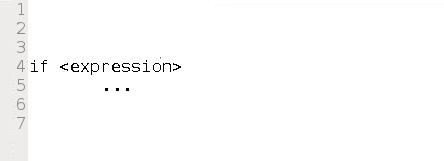
The if structure in Python is similar to the if…then in BASH. The syntax looks like this:


The control block in Python must be indented.

if …else:

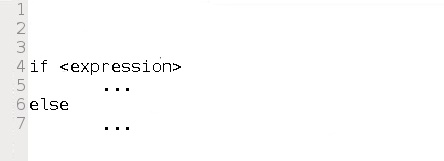
The if…else structure in Python is similar to the if…then …else in BASH scripting. The syntax looks like this:


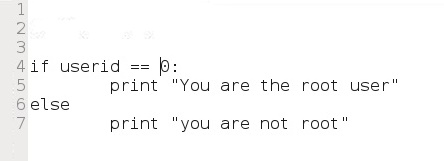
For example, here we have code snippet that checks the value of a user ID, if it is 0, then we print a message “You are root.” Else, if it is any other value, we print the message “You are not root.”


Loops:

Loops are another useful structure in Python. The two must widely used arewhile and for.

while:

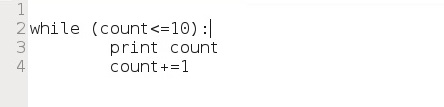
The while statement evaluates a Boolean expression (evaluates to true or false) and continues execution while the expression evaluates to true. For example, we could create a code snippet that prints each number from 1 until 10 and then exits the loop.


for:

The for loop assigns values from a list, string, or other iterable structure such as a dictionary, to loop an index variable each time through the loop. For example we can use a for loop to attempt passwords like in our script below.

Creating an FTP Password Cracker

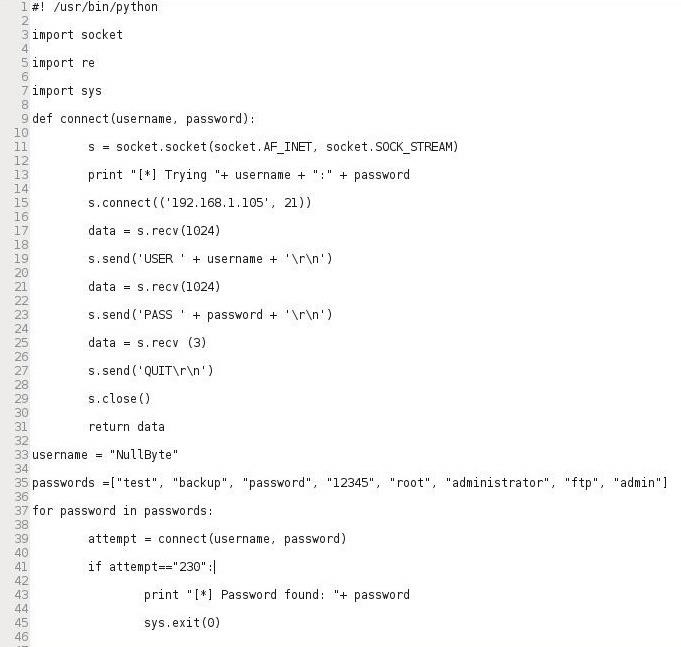
Now that we have three lessons in Python under our belt, let’s create a simple FTP password cracker in Python. Let’s open a text editor in Kali (I’m using Leafpad) and enter the following script below.

Note that we import the socket, re, and sys modules (Lines 3-7), then create a socket that attempts to connect to specified IP address on port 21 (lines 11-15), then create a variable username which is assigned “NullByte” (Line 33), then create a list called “passwords” with potential passwords (Line 35), then create a for loop trying each password until it receives a code 230 or exhausts the password list.


Of course, you can change the values in this script to any that you want and are appropriate to your circumstances. In future tutorials, we will modify this password cracker to give it even greater usability and versatility.

Save it as “ftpcracker.py” and give yourself execute permissions, then run the script against an FTP server.

kali > chmod 755 ftpcracker.py

kali > ./ftpcracker.py


If it finds the password, it will print the message ‘Password found: <password>” (Line 43).

Keep coming back, my novice hackers, as we continue to expand our scripting skills to the level of a pro hacker!

Enable Registry Editor disabled by Administrator or Malware


Welcome back,

This problem is faced by many windows users as they cant able to access there registry editor. here is quick solution

Registry Editor is a useful utility in Windows which allows users to easily change advanced Windows settings by altering registry keys present in a hierarchical arrangement called the Windows Registry. Despite being such a powerful tool, Registry Editor is not totally error-proof.

A simple virus infection is all it takes to render it useless. Or, there are times when your administrator has actually disabled Registry Editing. When you try to open the Registry Editor in one such computer, you are likely to receive the“Registry editing has been disabled by your administrator” error. Due to this error, it is impossible to remove this restriction using the Registry Editor itself.

Windows Registry Editor


This article suggests some workarounds for re-enabling Registry editing in a computer running Windows XP, Windows Vista, Windows Server 2003/ 2008, Windows 7,, Windows 8 or Windows 8.1.
Enable Registry Editor using the Group Policy Editor
Click on Start. Go to Run. Users running Windows 8.1, Windows 8, Windows 7 or Vista, go to Search.
Type gpedit.msc and press Enter.
Navigate to User Configuration/ Administrative Templates / System.
In the work area, double click on “Prevent Access to registry editing tools”.
In the popup window, encircle Disabled and click on OK.
Normally, Registry Editor will be immediately accessible. If it is not, restart your PC.

Group Policy Editor is not available on home editions of Windows.

Getting access to Registry editing


Related: Enable Task Manager disabled by Administrator or Virus
Enabling Registry Editor using UnHookExec.inf from Symantec

Symantec has created a small .inf file which can be installed to remove restrictions on modifying registry keys at the click of a mouse. Most viruses, spywares, Trojans or worms normally affect the shell\open\command keys which allows them to run each time when a file of specific type is executed. Normally, they associate their execution with .exe files. UnHookExec.inf not only enables registry editing but also removes such associations.

Just save UnHookExec.inf and install it by right clicking and selecting install. Installing the file will not show any popup or notice box.
Enable Regedit by simply running a CMD Command
Open Notepad.
Copy the code given below and paste it.


reg add “HKCU\Software\Microsoft\Windows\CurrentVersion\Policies\System” /t Reg_dword /v DisableRegistryTools /f /d 0
Save the file as EnableRegistry.bat. Run this file as Administrator if you use Windows 8, Windows 7 or Windows Vista. In Windows XP, simply open the file. CMD will flash for a second and then disappear. This indicates successful execution.
Log Off and Log Back On.


Visual Basic Script to Enable/ Disable Registry Editor

Doug Knox has created a VBS Script which allows users to easily enable and disable the Registry Editor. Just download regedit tools.zip, extract the VBS file and double click on it. This script reverses the current state of the Registry Editor. If registry editing is set to enabled, this script will disable it and if it is disabled, it will enable it.

If the above link does not work, copy the code given below in Notepad and save the file as *.vbs orRegistry Editor.vbs.


Option Explicit
Dim WSHShell, n, MyBox, p, t, mustboot, errnum, vers
Dim enab, disab, jobfunc, itemtype
Set WSHShell = WScript.CreateObject(“WScript.Shell”)
p = “HKCU\Software\Microsoft\Windows\CurrentVersion\Policies\System\”
p = p & “DisableRegistryTools”
itemtype = “REG_DWORD”
mustboot = “Log off and back on, or restart your pc to” & vbCR & “effect the changes”
enab = “ENABLED”
disab = “DISABLED”
jobfunc = “Registry Editing Tools are now “
t = “Confirmation”
Err.Clear
On Error Resume Next
n = WSHShell.RegRead (p)
On Error Goto 0
errnum = Err.Number
if errnum <> 0 then
WSHShell.RegWrite p, 0, itemtype
End If
If n = 0 Then
n = 1
WSHShell.RegWrite p, n, itemtype
Mybox = MsgBox(jobfunc & disab & vbCR & mustboot, 4096, t)
ElseIf n = 1 then
n = 0
WSHShell.RegWrite p, n, itemtype
Mybox = MsgBox(jobfunc & enab & vbCR & mustboot, 4096, t)
End If

Monday, 25 May 2015

All about Hacking


What is Hacking?
During the 1990s, the term “hacker” originally denoted a skilled programmer proficient in machine code and computer operating systems. In particular, these individuals could always hack on an unsatisfactory system to solve problems and engage in a little software company espionage by interpreting a competitor’s code.

Unfortunately, some of these hackers also became experts at accessing password-protected computers, files, and networks and came to known as “crackers.” Of course, an effective and dangerous “cracker” must be a good hacker and the terms became intertwined. Hacker won out in popular use and in the media and today refers to anyone who performs some form of computer sabotage.
Hacker Tools

There now are more than 100,000 known viruses with more appearing virtually daily. The myriad of hackers and their nefarious deeds can affect any computer owner whether an occasional home user, e-mailer, student, blogger, or a network administrator on site or on the internet. No matter your level of computer use, you must protect your computer, business, or even your identity. The best way to know how to protect your computer is to understand the hacker’s tools and recognize their damage.
Viruses, Exploits, Worms, and More

The term computer “virus” originated to describe machine code command inserted into a computer’s memory that, on execution, copies itself into other programs and files on the computer. Depending on the hacker’s intent, the design of a virus can merely be an inconvenience or have very serious consequences up to a potential catastrophe.

Generally, a virus is a piece of software, a series of data, or a command sequence that exploits a bug, glitch, or vulnerability. Each example is appropriately termed an “exploit.” An exploit causes unintended or unanticipated behavior to occur in a computer’s operating system or applications while propagating itself within the computer.

An exploit and operates through a network security vulnerability or “hole” without previous access to the vulnerable system is a “remote” exploit. An exploit that needs prior access to a system is termed a “local” exploit. These are usually intended to increase the hacker’s access privileges beyond those granted by a system administrator.

Worms are simply viruses that send copies over network connections. A bomb resides silently in a computer’s memory until set off by a date or action. A Trojan horse is a malicious program that cannot reproduce itself, but is distributed by CD or e-mail.
Protect Your Computer: Avoid Computer Holes/Vulnerabilities

Install only trusted software and delete unknown emails. If you have any doubt about a piece of software’s function, do not install it. If you receive e-mails from random people’s names, resist your curiosity and do not open it, just delete it.

Under no conditions download or open attachments from anyone that you do not know and even then be cautious. Banks and most companies that create online personal accounts will not send you attachments. If they do, it is probably best to go to the company site and request the download or at least see if it is legitimate. Avoid adult web sites, a hacker’s paradise.

Whether in your e-mail or online, do not click on ads. If the ad is of interest, find the site. Be careful with what you physically put into your computer. This is especially true for shared R/W CDs, USB hard disks, or flash drives. This is an easy path for a virus to follow from computer to computer.
Protection: Install Anti-Virus Software

Anti-virus software searches for evidence of the presence of viral programs, worm, bombs, and Trojan horses by checking for the characteristic appearances or behaviors that is typical of these programs. When found the program logs its discovery, its type, often its name or an identifier, and it potential for damage. The anti-virus software then eliminates or isolates/quarantines the infected files. For the individual, commercial software is relatively inexpensive; however, there are free anti-virus programs available.

Since new viruses appear almost daily with new code it is imperative that you update you antivirus program often to keep up with these threats; therefore, make sure to set your program to update automatically. To avoid the annoyance of computer slowdown schedule full scale scans late at night.

The same is true for your Windows Operating System. Very often, your OS is where hackers discover the holes to exploit. Of course, in an ever-continuing battle, this software is continuously updated with security patches.

Finally, secure your wireless network with a router that has a built in firewall. Almost all wireless routers are set to no security when first installed. Log into the router and at least set it to basic security with a strong password to replace the factory setting that any hacker knows. A firewall or router that is not configured properly or non-existent allows hackers to scan passwords, e-mails, or files that cross your network connection.
Types of Hacker

A hacker is basically someone who breaks into computer networks or standalone personal computer systems for the challenge of it or because they want to profit from their innate hacking capabilities. The hacker subculture that has developed among these new-age outlaws is often defined as the computer underground, although as of late it has evolved into a more open society of sorts. At any rate, here are the different types of hackers.

There are good and bad hackers. Here is a window into what they do and why:

White Hat Hackers: These are the good guys, computer security experts who specialize in penetration testing and other methodologies to ensure that a company’s information systems are secure. These IT security professionals rely on a constantly evolving arsenal of technology to battle hackers.

Black Hat Hackers: These are the bad guys, who are typically referred to as just plain hackers. The term is often used specifically for hackers who break into networks or computers, or create computer viruses. Black hat hackers continue to technologically outpace white hats. They often manage to find the path of least resistance, whether due to human error or laziness, or with a new type of attack. Hacking purists often use the term “crackers” to refer to black hat hackers. Black hats’ motivation is generally to get paid.

Script Kiddies: This is a derogatory term for black hat hackers who use borrowed programs to attack networks and deface websites in an attempt to make names for themselves.

Hacktivists: Some hacker activists are motivated by politics or religion, while others may wish to expose wrongdoing, or exact revenge, or simply harass their target for their own entertainment.

State Sponsored Hackers: Governments around the globe realize that it serves their military objectives to be well positioned online. The saying used to be, “He who controls the seas controls the world,” and then it was, “He who controls the air controls the world.” Now it’s all about controlling cyberspace. State sponsored hackers have limitless time and funding to target civilians, corporations, and governments.

Spy Hackers: Corporations hire hackers to infiltrate the competition and steal trade secrets. They may hack in from the outside or gain employment in order to act as a mole. Spy hackers may use similar tactics as hacktivists, but their only agenda is to serve their client’s goals and get paid.

Cyber Terrorists: These hackers, generally motivated by religious or political beliefs, attempt to create fear and chaos by disrupting critical infrastructures. Cyber terrorists are by far the most dangerous, with a wide range of skills and goals. Cyber Terrorists ultimate motivation is to spread fear, terror and commit murder.

Top 6 Websites To Learn Computer Programming Languages


Ever wanted to learn computer programming languages, but didn’t know where to start? Well, those days are over. Today learning programming languages is not really a hard job. If you are a beginner and have aptitude to learn computer programming then you can accomplish this goal within a few months. Here are the top 6 websites, which are useful for learning programming.

1. W3schools.com

If you are a beginner or intermediate programmer, then w3schools is an excellent website for learning programming. W3schools offer tutorials for a variety of web programming and scripting languages such as html, html5, css, asp, Ajax, JavaScript, php, jQuery etc. So, if you are into web development then w3schools would be a great learning resource.


2. Codeavengers.com:

If you want learn coding for making games, apps or websites using html/html5, css3, JavaScript python, but want an entertaining teaching resource. Then codeavengers.com is ideal choice for you. Codeavengers.com was designed by keeping difficulty for beginners in mind. It provides a fun and interactive learning environment that is effective for all age groups. Even if you are an intermediate programmer, you might find some great learning stuff there.


3. Codecademy.com

Codeacademy is another great website, for learning languages like JavaScript, HTML/CSS, PHP, Python, and Ruby. You can even learn how to use some popular web APIs in your website or app. Codeacademy has a great modern learning system, which is based on user interaction. It has full-fledged programming courses for beginners. Again, this website is great for beginners and intermediate learners. But advanced programmers can also find some pretty useful stuff there.


4. tutorialspoint.com

Tutorialspoint has tutorials for a lot of web, high level and scripting languages that are commonly used today. You can find tutorials for any computer language that you have ever heard of (those that are currently in used). Apart from that, it also features a variety of tutorials for other fields such as DIP, OS, SEO, Telecom, DBMS, and frameworks etc. Some commonly used languages that you can learn there are: Java, C++, PHP, Python, Ruby, C#, Perl, VB.Net, ios.


5. msdn.microsoft.com

Although, beginner programmers might find MSDN (Microsoft Developer Network) a tough learning resource, it is still the best resource you can get, if you want to master Microsoft oriented languages such as VB.Net, C# etc. MSDN has great tutorials for beginners, intermediate and advance programmers.


But as I stated earlier, beginners might not be initially comfortable with MDSN, as I has really a lot of resources that it would be a hard time for beginners to find what they are looking for. But if you get used to MSDN, then it is the ideal learning point for Microsoft oriented languages. You can get a lot of sample applications, tutorials and resources that are uploaded by Microsoft and MSDN community. Since it’s a developer’s network, you can even find development help from community members.


6. Lynda.com
You might already know about Lynda.com. Lynda offers easy to follow video tutorials. Lynda.com is an old and well established tutoring site, if you are looking for video tutorials to learn computer languages, then Lynda is your ideal choice. Apart from programming languages, Lynda also offers tutorials for a variety of other fields such as3D modeling, CAD, Photography etc. Lynda.com is an old and well established tutoring site.


So the next time someone asks you about your computer skills, you know where to turn. I hope you will learn a lot from these websites. All the best

12 Simple Steps To Become A Hacker


Hacking is an engaging field but it is surely not easy. To become a hacker one has to have an attitude and curiosity of learning and adapting new skills. You must have a deep knowledge ofcomputer systems, programming languages, operating systems and the journey of learning goes on and on. Some people think that a hacker is always a criminal and do illegal activities but they are wrong. Actually many big companies hire hackers to protect their systems and information and are highly paid. We have prepared a list of 12 most important steps necessary to become a hacker, have a deeper look
1. Learn UNIX/LINUX

UNIX/LINUX is an open source operating system which provides better security tocomputer systems. It was first developed by AT&T in Bell labs and contributed a lot in the world of security. You should install LINUX freely available open source versions on your desktops as without learning UNIX/LINUX, it is not possible to become a hacker.


2. Code in C language

C programming is the base of learning UNIX/LINUX as this operating system is coded in C programming which makes it the most powerful language as compared to other programming languages. C language was developed by Dennis Ritchie in late 1970’s. To become a hacker you should master C language.


3. Learn to code in more than one Programming Language


It is important for a person in the hacking field to learn more than one programming. There are many programming languages to learn such as Python, JAVA, C++. Free eBooks, tutorials are easily available online.


4. Learn Networking Concepts

Another important and essential step to become a hacker is to be good at networking concepts and understanding how the networks are created. You need to know the differences between different types of networks and must have a clear understanding of TCP/IP and UDP to exploit vulnerabilities (loop holes) in system.

Understanding what LAN, WAN, VPN, Firewall is also important.
You must have a clear understanding and use of network tools such as Wireshark, NMAP for packet analyzing, network scanning etc.


5. Learn More Than One Operating Systems

It is essential for a hacker to learn more than one operating system. There are many other Operating systems apart from Windows, UNIX/LINUX etc. Every system has a loop hole, hacker needs it to exploit it.


6. Learn Cryptography

To become a successful hacker you need to master the art of cryptography. Encryption and Decryption are important skills in hacking. Encryption is widely done in several aspects of information system security in authentication, confidentiality and integrity of data. Information on a network is in encrypted form such as passwords. While hacking a system, these encrypted codes needs to be broken, which is called decryption.


7. Learn more and more about hacking

Go through various tutorials, eBooks written by experts in the field of hacking. In the field of hacking, learning is never ending because security changes every day with new updates in systems.


8. Experiment A Lot

After learning some concepts, sit and practice them. Setup your own lab for experimental purpose. You need a good computer system to start with as some tools may require powerful processor, RAM etc. Keep on Testing and learning until you breach a system.


9. Write Vulnerability (Loop hole program)


Vulnerability is the weakness, loop hole or open door through which you enter the system. Look for vulnerabilities by scanning the system, network etc. Try to write your own and exploit the system.


10. Contribute To Open Source Security Projects

An open source computer security project helps you a lot in polishing and testing your hacking skills. It’s not a piece of cake to get it done. Some organizations such as MOZILLA, APACHE offer open source projects. Contribute and be a part of them even if your contribution is small, it will add a big value to your field.


11. Continue never ending Learning

Learning is the key to success in the world of hacking. Continuous learning and practicing will make you the best hacker. Keep yourself updated about security changes and learn about new ways to exploit systems


12. Join Discussions and meet hackers

Most important for a hacker is to make a community or join forums, discussions with other hackers worldwide, so that they can exchange and share their knowledge and work as a team. Join Facebook groups related to hacking where you can get more from experts…

Internet Guide


Internet


The Internet is a computer network made up of thousands of networks worldwide. No one knows exactly how many computers are connected to the Internet. It is certain, however, that these number in the millions.

No one is in charge of the Internet. There are organizations which develop technical aspects of this network and set standards for creating applications on it, but no governing body is in control. The Internet backbone, through which Internet traffic flows, is owned by private companies.

All computers on the Internet communicate with one another using the Transmission Control Protocol/Internet Protocol suite, abbreviated to TCP/IP. Computers on the Internet use a client/server architecture. This means that the remote server machine provides files and services to the user’s local client machine. Software can be installed on a client computer to take advantage of the latest access technology.


An Internet user has access to a wide variety of services: electronic mail, file transfer, vast information resources, interest group membership, interactive collaboration, multimedia displays, real-time broadcasting, shopping opportunities, breaking news, and much more.

The Internet consists primarily of a variety of access protocols. Many of these protocols feature programs that allow users to search for and retrieve material made available by the protocol.

——————————————————————————–

COMPONENTS OF THE INTERNET

——————————————————————————–

WORLD WIDE WEB

The World Wide Web (abbreviated as the Web or WWW) is a system of Internet servers that supports hypertext to access several Internet protocols on a single interface. Almost every protocol type available on the Internet is accessible on the Web. This includes e-mail, FTP, Telnet, and Usenet News. In addition to these, the World Wide Web has its own protocol: HyperText Transfer Protocol, or HTTP. These protocols will be explained later in this document.

The World Wide Web provides a single interface for accessing all these protocols. This creates a convenient and user-friendly environment. It is no longer necessary to be conversant in these protocols within separate, command-level environments. The Web gathers together these protocols into a single system. Because of this feature, and because of the Web’s ability to work with multimedia and advanced programming languages, the Web is the fastest-growing component of the Internet.


The operation of the Web relies primarily on hypertext as its means of information retrieval. HyperText is a document containing words that connect to other documents. These words are called links and are selectable by the user. A single hypertext document can contain links to many documents. In the context of the Web, words or graphics may serve as links to other documents, images, video, and sound. Links may or may not follow a logical path, as each connection is programmed by the creator of the source document. Overall, the Web contains a complex virtual web of connections among a vast number of documents, graphics, videos, and sounds.

Producing hypertext for the Web is accomplished by creating documents with a language called HyperText Markup Language, or HTML. With HTML, tags are placed within the text to accomplish document formatting, visual features such as font size, italics and bold, and the creation of hypertext links. Graphics and multimedia may also be incorporated into an HTML document. HTML is an evolving language, with new tags being added as each upgrade of the language is developed and released. The World Wide Web Consortium (W3C), led by Web founder Tim Berners-Lee, coordinates the efforts of standardizing HTML. The W3C now calls the language XHTML and considers it to be an application of the XML language standard.

The World Wide Web consists of files, called pages or home pages, containing links to documents and resources throughout the Internet.

The Web provides a vast array of experiences including multimedia presentations, real-time collaboration, interactive pages, radio and television broadcasts, and the automatic “push” of information to a client computer. Programming languages such as Java, JavaScript, Visual Basic, Cold Fusion and XML are extending the capabilities of the Web. A growing amount of information on the Web is served dynamically from content stored in databases. The Web is therefore not a fixed entity, but one that is in a constant state of development and flux.

E-MAIL

Electronic mail, or e-mail, allows computer users locally and worldwide to exchange messages. Each user of e-mail has a mailbox address to which messages are sent. Messages sent through e-mail can arrive within a matter of seconds.


A powerful aspect of e-mail is the option to send electronic files to a person’s e-mail address. Non-ASCII files, known as binary files, may be attached to e-mail messages. These files are referred to as MIME attachments.MIME stands for Multimedia Internet Mail Extension, and was developed to help e-mail software handle a variety of file types. For example, a document created in Microsoft Word can be attached to an e-mail message and retrieved by the recipient with the appropriate e-mail program. Many e-mail programs, including Eudora, Netscape Messenger, and Microsoft Outlook, offer the ability to read files written in HTML, which is itself a MIME type.

TELNET

Telnet is a program that allows you to log into computers on the Internet and use online databases, library catalogs, chat services, and more. There are no graphics in Telnet sessions, just text. To Telnet to a computer, you must know its address. This can consist of words (locis.loc.gov) or numbers (140.147.254.3). Some services require you to connect to a specific port on the remote computer. In this case, type the port number after the Internet address. Example: telnet nri.reston.va.us 185.


Telnet is available on the World Wide Web. Probably the most common Web-based resources available through Telnet have been library catalogs, though most catalogs have since migrated to the Web. A link to a Telnet resource may look like any other link, but it will launch a Telnet session to make the connection. A Telnet program must be installed on your local computer and configured to your Web browser in order to work.

With the increasing popularity of the Web, Telnet has become less frequently used as a means of access to information on the Internet.

FTP

FTP stands for File Transfer Protocol. This is both a program and the method used to transfer files between computers. Anonymous FTP is an option that allows users to transfer files from thousands of host computers on the Internet to their personal computer account. FTP sites contain books, articles, software, games, images, sounds, multimedia, course work, data sets, and more.


If your computer is directly connected to the Internet via an Ethernet cable, you can use one of several PC software programs, such as WS_FTP for Windows, to conduct a file transfer.

FTP transfers can be performed on the World Wide Web without the need for special software. In this case, the Web browser will suffice. Whenever you download software from a Web site to your local machine, you are using FTP. You can also retrieve FTP files via search engines such as FtpFind, located at /http://www.ftpfind.com/. This option is easiest because you do not need to know FTP program commands.

E-MAIL DISCUSSION GROUPS

One of the benefits of the Internet is the opportunity it offers to people worldwide to communicate via e-mail. The Internet is home to a large community of individuals who carry out active discussions organized around topic-oriented forums distributed by e-mail. These are administered by software programs. Probably the most common program is the listserv.


A great variety of topics are covered by listservs, many of them academic in nature. When you subscribe to a listserv, messages from other subscribers are automatically sent to your electronic mailbox. You subscribe to a listserv by sending an e-mail message to a computer program called a listserver. Listservers are located on computer networks throughout the world. This program handles subscription information and distributes messages to and from subscribers. You must have a e-mail account to participate in a listserv discussion group. Visit Tile.net at /http://tile.net/ to see an example of a site that offers a searchablecollection of e-mail discussion groups.

Majordomo and Listproc are two other programs that administer e-mail discussion groups. The commands for subscribing to and managing your list memberships are similar to those of listserv.

USENET NEWS

Usenet News is a global electronic bulletin board system in which millions of computer users exchange information on a vast range of topics. The major difference between Usenet News and e-mail discussion groups is the fact that Usenet messages are stored on central computers, and users must connect to these computers to read or download the messages posted to these groups. This is distinct from e-mail distribution, in which messages arrive in the electronic mailboxes of each list member.


Usenet itself is a set of machines that exchanges messages, or articles, from Usenet discussion forums, called newsgroups. Usenet administrators control their own sites, and decide which (if any) newsgroups to sponsor and which remote newsgroups to allow into the system.

There are thousands of Usenet newsgroups in existence. While many are academic in nature, numerous newsgroups are organized around recreational topics. Much serious computer-related work takes place in Usenet discussions. A small number of e-mail discussion groups also exist as Usenet newsgroups.

The Usenet newsfeed can be read by a variety of newsreader software programs. For example, the Netscape suite comes with a newsreader program called Messenger. Newsreaders are also available as standalone products.

FAQ, RFC, FYI

FAQ stands for Frequently Asked Questions. These are periodic postings to Usenet newsgroups that contain a wealth of information related to the topic of the newsgroup. Many FAQs are quite extensive. FAQs are available by subscribing to individual Usenet newsgroups. A Web-based collection of FAQ resources has been collected by The Internet FAQ Consortium and is available at /http://www.faqs.org/.


RFC stands for Request for Comments. These are documents created by and distributed to the Internet community to help define the nuts and bolts of the Internet. They contain both technical specifications and general information.

FYI stands for For Your Information. These notes are a subset of RFCs and contain information of interest to new Internet users.


CHAT & INSTANT MESSENGING

Chat programs allow users on the Internet to communicate with each other by typing in real time. They are sometimes included as a feature of a Web site, where users can log into the “chat room” to exchange comments and information about the topics addressed on the site. Chat may take other, more wide-ranging forms. For example, America Online is well known for sponsoring a number of topical chat rooms.


Internet Relay Chat (IRC) is a service through which participants can communicate to each other on hundreds of channels. These channels are usually based on specific topics. While many topics are frivolous, substantive conversations are also taking place. To access IRC, you must use an IRC software program.

A variation of chat is the phenomenon of instant messenging. With instant messenging, a user on the Web can contact another user currently logged in and type a conversation. Most famous is America Online’s Instant Messenger. ICQ, MSN and Yahoo are other commonly-used chat programs.

Other types of real-time communication are addressed in the tutorial Understanding the World Wide Web.

MUD/MUSH/MOO/MUCK/DUM/MUSE


MUD stands for Multi User Dimension. MUDs, and their variations listed above, are multi-user virtual reality games based on simulated worlds. Traditionally text based, graphical MUDs now exist. There are MUDs of all kinds on the Internet, and many can be joined free of charge.

Man-in-the-Middle Attack


Hello my dear friends,
Many of you have probably heard of a man-in-the-middle attack and wondered how difficult an attack like that would be. For those of you who’ve never heard of one, it’s simply where we, the hacker, place ourselves between the victim and the server and send and receive all the communication between the two.

It should be totally transparent to both the client and the server with neither suspecting they’re connected to anything or anyone but who they expect. This allows us to see and read all of the communication (passwords, confidential information, etc.), as well as alter it, if need be.

In this tutorial, I’ll show you a very simple way to conduct a MitM attack and capture unencrypted traffic.
The Art of Sniffing

Before we embark on a MitM attack, we need to address a few concepts. First, sniffing is the act of grabbing all of the traffic that passes you over the wired or wireless communication. There are a number of tools that will enable you to do this. Most famously, Wireshark, but also tcpdump, dsniff, and a handful of others.
Enter Promiscuous Mode

In order to see and grab traffic other than your own, you need to first put your NIC or wireless adapter into promiscuous mode (called monitor mode in wireless), meaning that it will pick up ALL traffic, not just that intended for your MAC/IP address. In wireless and wired networks with hubs, this can be accomplished relatively easily. In a switched environment, we need to be a bit more creative.
Switches & Spoofing

Switches are designed to reduce network traffic and congestion by isolating traffic and only sending packets to a particular IP address or MAC address that’s the destination, unlike hubs that send all traffic to all NICs. This means that my NIC only sees traffic intended for it, if the switch is doing its job. This makes it harder, but not impossible to sniff and thereby conduct a MiTM attack.
To defeat the switches task of isolating network traffic, a number of strategies have been attempted. On older switches, you could flood them with ARPs and the switch would flood and fail open. These means that it would begin to act like a hub, sending all the traffic to all the NICs, enabling the hacker to sniff other people’s traffic.
This strategy no longer works on modern switches and even on the older ones, a vigilant network admin is going to notice the change in network traffic and volume.
In order for switches to “know” where to send traffic, they maintain a CAM table that essentially maps IP addresses to MAC addresses. This table says that when traffic is intended for IP address 192.168.1.101, for instance, send that traffic to MAC address 11:22:33:44:EE:FF (example MAC address).
If we can change the entries in that table, we can successfully get someone else’s traffic. This is called ARP spoofing, because the entries in the CAM table come from ARPs that are sent out by the switch to gather this information from the NIC.
ARP Spoofing for a MitM Attack

What we will be doing here, is using ARP spoofing to place ourselves between two machines making the client believe we are the server and the server believe we are the client. With this, we can then send all the traffic through our computer and sniff every packet that goes in either direction.
Hope all that makes sense! Let’s get started with our MitM attack by opening up BackTrack or Kali !
Step 1: Open Three Terminals

To conduct this MitM attack, we’re going to need three (3) terminals, so go ahead and open those now. Our goal here is to get a client on our network to believe we are the server and the server to believe we are the client.


arpspoof can do this for us by replacing the MAC address of the client and the server with our MAC address in the ARP table.
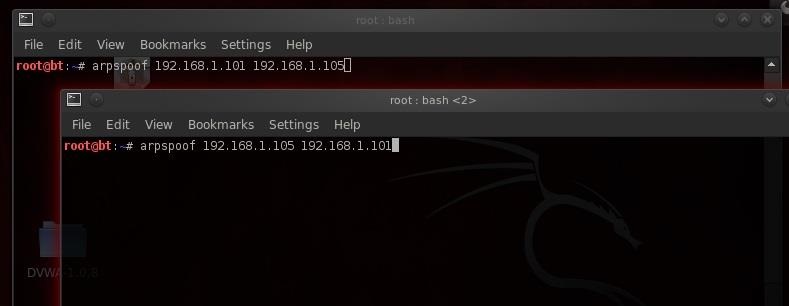
Step 2: Arpspoof Client to Server

Let’s start with the client. We want to replace the MAC address of the server with our MAC address.
arpspoof 192.168.1.101 192.168.1.105

Where:
192.168.1.101 is the IP of the client
192.168.1.105 is the IP of the server

In this step, we’re telling the client that we are the server.
Step 3: Arpspoof Server to Client

Now we want to replace the MAC address of the client with our address, so we simply reverse the order of the IP addresses in the previous command.
arpspoof 192.168.1.105 192.168.1.101


Here, we are telling the server that we are the client.

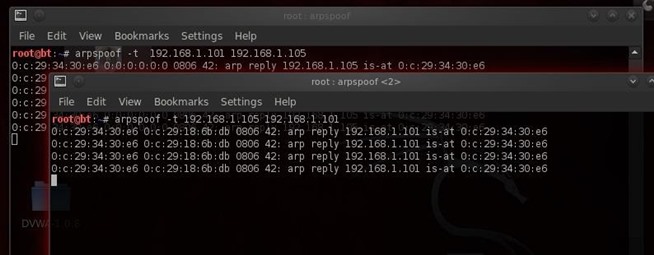
Now execute both of these commands. When we do this, the client will think we are the server and the server will think we are the client!


Step 4: Pass Packets with Ipforward

Now that we are impersonating both the client and server, we need to be able to pass or forward the packets to the other machine. In other words, we want the packets coming from the server to be forwarded to the client and those coming from the client forwarded to the server.

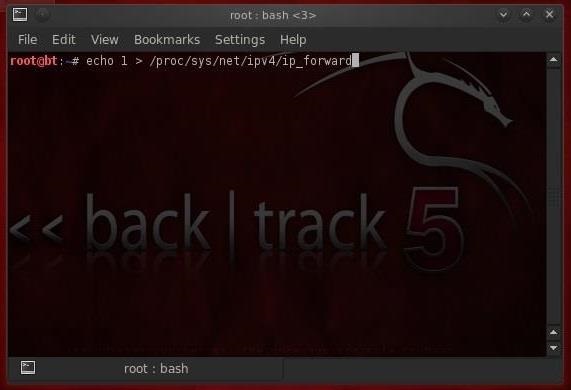
We do this in Linux by using the ip_forward. Linux has a built-in functionality to forward packets it receives. By default, it’s turned off, but we can turn it on by changing its value to 1(ON).

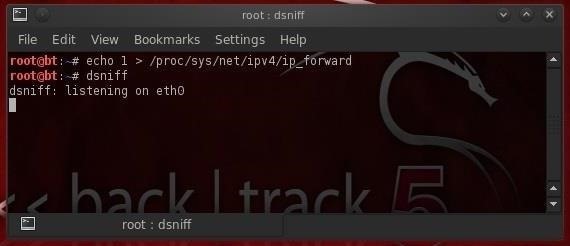
We simply echo a 1 and direct (>) it to /proc/sys/net/ipv4/ip_forward, thereby turning on ipforwarding.
echo 1 > /proc/sys/net/ipv4/ip_forward


Now our system, in the middle, is forwarding the traffic it receives to both ends of this connection, client and server.
Step 5: Sniff the Traffic with Dsniff

Now that we have all the traffic coming from the client to the server and the server to the client going through our computer, we can sniff and see all the traffic!

To do this, we could use a number of different sniffing tools, including Wireshark or tcpdump, but in this case we’ll use Dug Song’s dsniff. Song designed dsniff to sniff out authentication information that appears on the wire in clear text (non-encrypted). So, protocols such as ftp, telnet, HTTP, SNMP, POP, LDAP, etc. can be sniffed off the wire.

To activate dsniff, we simply type:
dsniff


As we can see, dsniff responds that it is listening on eth0.
Step 6: Grab the FTP Credentials

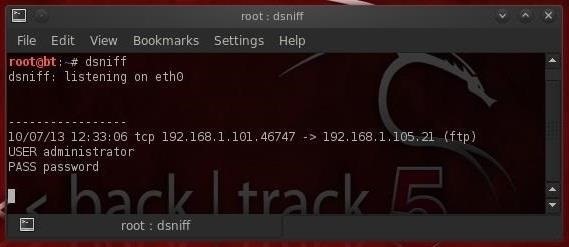
Now, let’s wait until the client logs into the ftp server. When he does so, dsniff will grab his credentials and display them to us.


As you see in the screenshot above, dsniff has grabbed the ftp credentials of the administrator with the password of “password”! How easy was that!

It’s important to note that users and administrators often use that same username and password on all services and systems. Now that we have the admin’s ftp password, the next step is to try to log in with it.

In my next MitM tutorial, I’ll show you how to sniff encrypted credentials off the wire, so keep coming back!


if you like our work then contact us to give feedback.